Executive summary
We’ve all seen the demo apps. Someone hooks an LLM to a database, asks it to buy a pair of shoes, and everyone cheers. But if you’ve ever run a real-world eCommerce enterprise, especially one powered by Adobe Commerce (Magento) with pricing, fitment, and inventory split across multiple legacy ERPs, you know that simple API-wrapping demos collapse in production.
Key takeaways
- Intent over endpoints: Expose a small set of buyer-journey tools instead of dozens of REST or GraphQL endpoints.
- Separate layers: Keep intent resolution at the MCP boundary and execution in your deterministic commerce backend.
- Two-phase cart changes: Preview first with a short-lived handle, then commit with an idempotency key.
- Dual-layer security: Validate the client’s token, then verify that the user owns the account or cart in every tool call.
- Structured errors: Return named business errors, not stack traces, so the agent can adapt its conversation.
Why do simple API-wrapping demos collapse in production?
When you dump dozens or hundreds of standard REST or GraphQL endpoints directly into an AI agent context via the Model Context Protocol (MCP), the agent often becomes confused, hallucinates non-existent SKUs, triggers accidental backend transactions, or hits rate limits. Industry research reflects this broader challenge: Gartner predicts that over 40% of agentic AI projects will be canceled by the end of 2027 because of escalating costs, unclear business value, or inadequate risk controls.
Demo: wrap every endpoint
The agent sees hundreds of endpoints
- Hallucinates non-existent SKUs
- Triggers accidental transactions
- Hits rate limits
Production: intent-driven tools
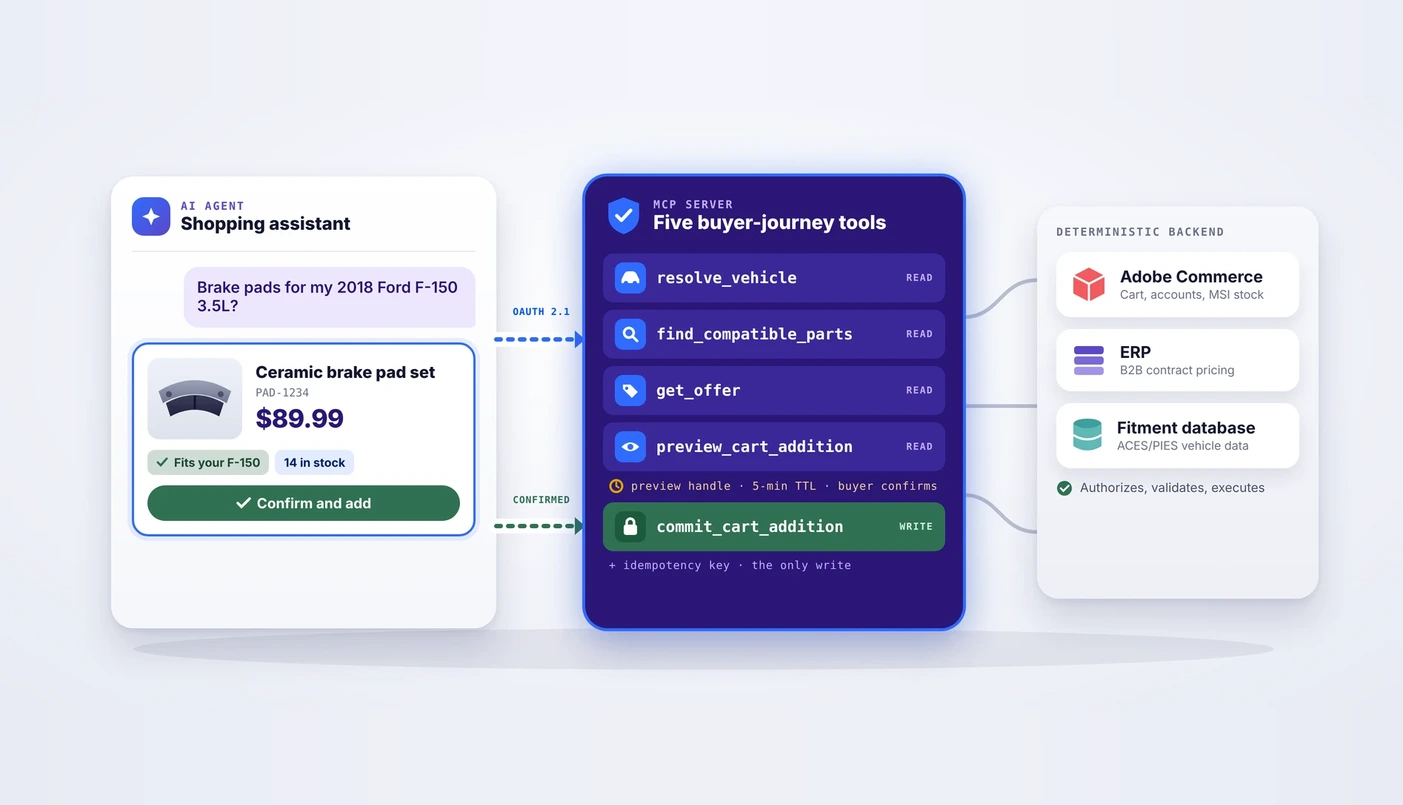
The agent sees five buyer-journey tools
resolve_vehicleREADfind_compatible_partsREADget_offerREADpreview_cart_additionREADcommit_cart_additionWRITE- Backend still authorizes and executes
A production-grade commerce MCP server is not a 1:1 mirror of your backend API. It is a secure, intent-driven translation layer that exposes a small number of stable business capabilities. Meanwhile, your underlying deterministic commerce services continue to authorize, validate, execute, record, and verify every action.
Fragmented commerce systems make the boundary problem harder
In multi-ERP commerce environments, pricing, inventory allocation, and product fitment data often live in separate systems. This fragmentation creates the kind of orchestration and boundary problems a well-designed MCP server is meant to solve.
Here is a practical approach to building one that can handle enterprise traffic, drawn from the integration patterns behind our Adobe Commerce development and integration services.
About this approach. This guidance is grounded in the official Model Context Protocol specification and publicly documented Adobe Commerce MCP capabilities. It focuses on architectural patterns that keep deterministic commerce systems in control while giving agents a narrow, reliable interface.
What actually makes a commerce MCP server production-grade?
Think of the MCP server as a highly trained specialist at the counter of an auto-parts store. The customer does not care about internal database schemas or GraphQL syntax; they want to know whether a specific brake pad fits their 2018 Ford F-150 and how quickly they can receive it.
Baymard Institute research on eCommerce usability has repeatedly shown that search and product-finding friction, especially around compatibility and complex catalogs, leads to high abandonment. General cart abandonment rates remain around 70%, and search or filtering shortcomings frequently cause users to leave before converting.
Three layers separate intent resolution from execution
To make an MCP server production-grade, separate intent resolution from deterministic execution.
| Architecture layer | Key responsibilities | Key systems |
|---|---|---|
| Agent / MCP Boundary | Translates buyer intent into structured tool calls; sanitizes inputs and untrusted data. | MCP Server (official SDK) |
| Orchestration Layer | Coordinates multi-system lookups, generates short-lived state handles, records price snapshots. | Node.js / Python service |
| Deterministic Backend | Handles business logic, RBAC, inventory allocation, taxation, and order persistence. | Adobe Commerce, SAP ERP, custom fitment DB |
The orchestration layer is where deterministic business rules stay in charge, which is central to modernizing legacy applications for AI agents.
The reference architecture puts an edge gateway between agents and commerce systems
In many enterprise environments, Adobe Commerce manages the core cart and customer accounts, while legacy systems hold vehicle fitment data (for example, ACES/PIES standards in automotive) and a real-time ERP manages B2B contract pricing and salable stock.
An AI agent interacting over MCP should never talk directly to these systems. The MCP server acts as an edge gateway that orchestrates calls and presents unified, task-centric tools.
Layer 1
Agent / MCP boundary
Intent resolutionFive buyer-journey tools
Layer 2
Orchestration layer
Coordination and stateNode.js / Python
Layer 3
Deterministic backend
Authorizes, validates, executesCart, accounts, MSI salable quantity
B2B contract pricing, salable stock
ACES/PIES vehicle data
The MCP server assumes a solid catalog-readiness foundation already exists and focuses on runtime tool execution. Official MCP documentation defines the protocol, tool schemas, and transports (stdio and Streamable HTTP). Each connection to fitment, ERP, and inventory systems typically needs custom Adobe Commerce development and integrations rather than off-the-shelf connectors.
Where Adobe’s Commerce MCP capabilities fit
Adobe has also published Commerce MCP capabilities that expose catalog, cart, pricing, inventory, and related operations for agentic experiences.
Why should tools be designed around buyer intent instead of backend endpoints?
Exposing low-level endpoints such as POST /rest/V1/carts/mine/items forces the agent to spend tokens constructing payloads and risks out-of-order mutations.
Five tools cover the buyer journey
Instead, design tools around a focused buyer journey:
resolve_vehicle: Translates ambiguous input (for example, “2018 F150 3.5L”) into a canonical vehicle ID.find_compatible_parts: Queries the catalog using the canonical vehicle ID and category constraints.get_offer: Merges product data with real-time customer-specific B2B pricing and Adobe Commerce salable quantity.preview_cart_addition: Performs a dry-run validation and returns a short-lived, immutable preview handle.commit_cart_addition: Executes the atomic transaction using the preview handle and an idempotency key. It is the only tool in this workflow that changes commerce state.
The five tools in sequence
The first four calls read data; only the fifth writes to the cart.
- 01 · READ
resolve_vehicleCanonical vehicle ID - 02 · READ
find_compatible_partsCompatible SKUs - 03 · READ
get_offerLive price and salable stock - 04 · READ
preview_cart_additionPreview handle with short TTL - GATEBuyer confirmsExplicit yes to the price summary
- 05 · WRITE
commit_cart_additionPreview handle plus idempotency key
How do you build the read path for vehicle fitment and compatibility?
Resolve ambiguity before hitting the catalog
The read path must resolve ambiguity before hitting heavy catalog endpoints.
Treat catalog and supplier text as untrusted data
Always treat catalog descriptions and supplier text as untrusted data. Malicious or poorly sanitized content can contain prompt-injection payloads.
Illustrative TypeScript handling (using mocks for clarity; production code would call real services):
// Sanitization utility to defend against untrusted catalog text
function sanitizeUntrustedText(text: string): string {
  return text
    .replace(/[\r\n]+/g, " ")
    .replace(/[{}<>[\]]/g, "")
    .trim();
}

// Tool 1: Resolve Vehicle
export async function handleResolveVehicle(args: {
  year: number;
  make: string;
  model: string;
  engine?: string;
}) {
  const matches = await legacyFitmentDb.queryVehicles(args);

  if (matches.length === 0) {
    return {
      isError: true,
      errorCode: "VEHICLE_NOT_FOUND",
      message: "No vehicle matches the provided specifications. Please verify year, make, and model."
    };
  }

  if (matches.length > 1) {
    return {
      status: "AMBIGUOUS",
      message: "Multiple vehicle sub-models matched. Please ask the user to clarify engine size.",
      options: matches.map((m) => ({
        vehicle_id: m.id,
        name: sanitizeUntrustedText(m.fullName)
      }))
    };
  }

  return {
    status: "RESOLVED",
    vehicle_id: matches[0].id,
    vehicle_name: sanitizeUntrustedText(matches[0].fullName)
  };
}
Legacy fitment must be merged with live pricing and salable stock
Once compatibility is confirmed, price and availability must be fetched live. In Adobe Commerce, inventory is governed by Multi-Source Inventory (MSI) salable quantities, and B2B pricing often comes from customer-group rules or external ERP calls.
// Tool 3: Get Offer
export async function handleGetOffer(args: {
  sku: string;
  vehicle_id: string;
  customer_account_id: string;
}) {
  // 1. Verify fitment compatibility
  const isCompatible = await legacyFitmentDb.verifyFitment(args.sku, args.vehicle_id);
  if (!isCompatible) {
    return {
      isError: true,
      errorCode: "INCOMPATIBLE_PART",
      message: `SKU ${args.sku} is not compatible with vehicle ID ${args.vehicle_id}.`
    };
  }

  // 2. Fetch live B2B price and Adobe Commerce Salable Quantity in parallel
  const [pricing, stock] = await Promise.all([
    adobeCommerceApi.getContractPrice(args.sku, args.customer_account_id),
    adobeCommerceApi.getSalableQuantity(args.sku)
  ]);

  if (stock.salableQuantity <= 0) {
    return {
      isError: true,
      errorCode: "OUT_OF_STOCK",
      message: `SKU ${args.sku} is currently out of stock. Next estimated availability: ${stock.nextRestockDate}`
    };
  }

  return {
    sku: args.sku,
    unit_price: pricing.finalPrice,
    currency: pricing.currency,
    salable_quantity: stock.salableQuantity,
    fitment_verified: true
  };
}
Why is a two-phase “preview and commit” strategy essential for cart mutations?
Allowing an agent to mutate state through a single add_to_cart tool is risky. Agents can loop, double-submit, or misinterpret intent. A two-phase pattern with short-lived state handles reduces this surface.
Stage 1 · Preview
preview_cart_addition
- Validates authorization
- Checks live stock
- Calculates taxes and price breakdown
preview_handle: short TTL (for example, 5 minutes), price and stock snapshot, no stock reservedStage 2 · Commit
commit_cart_addition
- Accepts handle and idempotency key
- Re-checks price and stock
- Only step that changes cart state
Rejected deterministically
Stage 1: Preview the cart addition
preview_cart_addition validates authorization, checks live stock, calculates taxes, generates a price breakdown, and returns a cryptographically secure preview_handle with a short TTL (for example, 5 minutes). The handle records a price and stock snapshot; it does not reserve stock in Adobe Commerce, so the commit step should re-check both.
Stage 2: Commit with an idempotency key
commit_cart_addition accepts the handle and an idempotency key. Expired, modified, or already-committed handles are rejected deterministically.
Concurrency and locking notes. The in-memory
Mapshown below is suitable only for single-process illustration. In production, store preview handles in a distributed cache such as Redis and use atomic operations (or distributed locks) when checking and marking a handle as committed. This prevents race conditions under concurrent agent requests.
Illustrative implementation:
import { randomUUID } from "node:crypto";

const handleStore = new Map<string, { data: any; expiresAt: number; committed: boolean }>();

export async function handlePreviewCartAddition(args: {
  sku: string;
  qty: number;
  vehicle_id: string; // resolved earlier by resolve_vehicle
  cart_id: string;
  customer_account_id: string;
}) {
  const offer = await handleGetOffer({
    sku: args.sku,
    vehicle_id: args.vehicle_id,
    customer_account_id: args.customer_account_id
  });

  if ("isError" in offer) return offer;

  const handleId = `ph_${randomUUID()}`;
  const expiresAt = Date.now() + 5 * 60 * 1000; // 5-minute TTL

  const previewData = {
    handle_id: handleId,
    sku: args.sku,
    qty: args.qty,
    unit_price: offer.unit_price,
    total_price: offer.unit_price * args.qty,
    currency: offer.currency,
    cart_id: args.cart_id,
    expires_at: new Date(expiresAt).toISOString()
  };

  handleStore.set(handleId, { data: previewData, expiresAt, committed: false });

  return {
    status: "PREVIEW_GENERATED",
    preview: previewData,
    instruction: "Present this price summary clearly to the user. Ask for explicit confirmation before calling commit_cart_addition."
  };
}

export async function handleCommitCartAddition(args: {
  preview_handle: string;
  idempotency_key: string;
}) {
  const record = handleStore.get(args.preview_handle);

  if (!record) {
    return {
      isError: true,
      errorCode: "EXPIRED_STATE_HANDLE",
      message: "The preview handle is invalid or expired. Please generate a new preview."
    };
  }

  if (record.committed) {
    return {
      isError: true,
      errorCode: "DUPLICATE_REQUEST",
      message: "This transaction handle has already been committed."
    };
  }

  if (Date.now() > record.expiresAt) {
    handleStore.delete(args.preview_handle);
    return {
      isError: true,
      errorCode: "EXPIRED_STATE_HANDLE",
      message: "Preview session expired. Prices and stock must be re-validated."
    };
  }

  try {
    const result = await adobeCommerceApi.addItemToCart({
      cartId: record.data.cart_id,
      sku: record.data.sku,
      qty: record.data.qty,
      idempotencyKey: args.idempotency_key
    });

    record.committed = true;
    return { status: "SUCCESS", cart_total: result.cartTotal, item_count: result.itemCount };
  } catch (error: any) {
    return {
      isError: true,
      errorCode: "BACKEND_TIMEOUT",
      message: error.message || "Failed to commit item to cart."
    };
  }
}
Protocol security and backend authorization need separate checks
Security requires dual-layer checks:
- Protocol Access Control (Transport Layer): Validate that the client connecting to the MCP server presents a valid OAuth 2.1 Bearer JWT (or equivalent), issued for this MCP server. Verify client identity and token expiry.
- Backend Domain Authorization (Application Layer): Verify that the authenticated principal actually owns or is authorized for the
customer_account_idorcart_idsupplied in tool arguments. Match the JWT payloadsubandtenant_idagainst the target account ID. Never trust the LLM to supply an arbitrary account identifier without cross-checking claims.
Check 1
Protocol access control
TRANSPORT LAYER
- Valid OAuth 2.1 bearer JWT issued for this MCP server
- Client identity and token expiry
Check 2
Backend domain authorization
APPLICATION LAYER
- JWT
subandtenant_idmatch the target account - Principal owns the
customer_account_idorcart_id
Then
Deterministic backend executesUNAUTHORIZED_ACCOUNT. Reject immediately and log a security incident. Never trust an account ID the LLM supplies.How do you handle retries, idempotency, and partial system failures?
Commerce backends encounter network issues, locks, and ERP latency. Tools should return structured business errors rather than raw stack traces, so the agent can adapt its conversation.
| Error code | Reason | Resolution |
|---|---|---|
AMBIGUOUS_VEHICLE | Input matches multiple sub-models | Return list of candidates; request user clarification. |
PRICE_MISMATCH | Cart preview price changed before commit | Discard state handle; trigger automated re-quote preview. |
OUT_OF_STOCK | Inventory exhausted during cart add | Offer stock notification or suggest compatible alternate SKUs. |
DUPLICATE_REQUEST | Re-submitted idempotency key | Return original successful commit payload without re-executing. |
EXPIRED_STATE_HANDLE | Commit attempt exceeded TTL | Instruct agent to rerun preview_cart_addition. |
UNAUTHORIZED_ACCOUNT | JWT account claim mismatches parameter | Reject request immediately; log security incident. |
BACKEND_TIMEOUT | Adobe Commerce / ERP latency spikes | Request retry with identical idempotency token after backoff. |
When you log these failures, record identity and session references rather than raw access or session tokens.
Production readiness depends on testing, observability, and safe deployment
Production readiness requires more than conversational testing.
Three tests to run before go-live
- Contract and Authorization Testing: Maintain schema fixtures for tool definitions and responses. Test both valid and invalid tokens.
- Failure Path Testing: Simulate rate limits, timeouts, and partial outages with mocks. Verify structured JSON business errors.
- OpenTelemetry Tracing: Propagate
traceparentheaders from the incoming MCP request through downstream Adobe Commerce and ERP calls, so latency can be attributed correctly.
Transport considerations: stdio vs. Streamable HTTP
The official MCP specification supports stdio (convenient for local development and single-process hosting) and Streamable HTTP (better suited for remote, multi-client, or containerized production deployments). Choose the transport that matches your operational model and ensure authentication is enforced at the transport boundary.
Assumptions and limitations
- Catalog readiness: This article assumes a solid catalog-readiness layer already exists (product data is ingested, indexed, and fitment relationships are maintained outside the MCP server).
- Illustrative code: All code examples are illustrative and use mocks. They are not production-ready. Replace mocks with real service clients, add proper distributed locking for state handles, implement full input validation, and harden error handling before deployment.
- Design priority: The patterns described prioritize safety and determinism over maximum agent autonomy.
What does a complete illustrative production structure look like?
The following is a self-contained, illustrative TypeScript server using the official @modelcontextprotocol/sdk. It implements the five-tool journey, structured errors, short-lived state handles, and basic OpenTelemetry instrumentation. All backend calls are mocked for clarity; replace them with real service clients in production.
import { Server } from "@modelcontextprotocol/sdk/server/index.js";
import { StdioServerTransport } from "@modelcontextprotocol/sdk/server/stdio.js";
import { CallToolRequestSchema, ListToolsRequestSchema } from "@modelcontextprotocol/sdk/types.js";
import { trace } from "@opentelemetry/api";

const tracer = trace.getTracer("commerce-mcp-server", "1.0.0");

// Mock services, replace with real clients
const mockFitment = {
  resolveVehicle: async (v: any) =>
    v.model === "F-150" ? [{ id: "v_f150_2018", fullName: "2018 Ford F-150 3.5L V6" }] : [],
  checkCompatibility: async (sku: string, vId: string) =>
    sku === "PAD-1234" && vId === "v_f150_2018"
};

const mockAdobeCommerce = {
  getOffer: async (sku: string) => ({ price: 89.99, currency: "USD", qty: 14 }),
  addToCart: async (cartId: string, sku: string, qty: number) => ({
    cartTotal: 89.99 * qty,
    itemCount: qty
  })
};

const stateHandles = new Map<string, any>();

const server = new Server(
  { name: "production-commerce-mcp", version: "1.0.0" },
  { capabilities: { tools: {} } }
);

server.setRequestHandler(ListToolsRequestSchema, async () => {
  return {
    tools: [
      {
        name: "resolve_vehicle",
        description: "Resolves year, make, model into a canonical vehicle_id.",
        inputSchema: {
          type: "object",
          properties: {
            year: { type: "number" },
            make: { type: "string" },
            model: { type: "string" }
          },
          required: ["year", "make", "model"]
        }
      },
      {
        name: "find_compatible_parts",
        description: "Finds parts compatible with a vehicle_id.",
        inputSchema: {
          type: "object",
          properties: {
            vehicle_id: { type: "string" },
            category: { type: "string" }
          },
          required: ["vehicle_id", "category"]
        }
      },
      {
        name: "get_offer",
        description: "Fetches live price and salable stock for a SKU and vehicle combination.",
        inputSchema: {
          type: "object",
          properties: {
            sku: { type: "string" },
            vehicle_id: { type: "string" },
            customer_account_id: { type: "string" }
          },
          required: ["sku", "vehicle_id", "customer_account_id"]
        }
      },
      {
        name: "preview_cart_addition",
        description: "Performs dry-run checks and records pricing in a short-lived preview handle.",
        inputSchema: {
          type: "object",
          properties: {
            sku: { type: "string" },
            qty: { type: "number" },
            cart_id: { type: "string" },
            customer_account_id: { type: "string" }
          },
          required: ["sku", "qty", "cart_id", "customer_account_id"]
        }
      },
      {
        name: "commit_cart_addition",
        description: "Executes cart mutation using an active preview_handle and idempotency key.",
        inputSchema: {
          type: "object",
          properties: {
            preview_handle: { type: "string" },
            idempotency_key: { type: "string" }
          },
          required: ["preview_handle", "idempotency_key"]
        }
      }
    ]
  };
});

server.setRequestHandler(CallToolRequestSchema, async (request) => {
  return tracer.startActiveSpan(`MCP Tool: ${request.params.name}`, async (span) => {
    try {
      const { name, arguments: args } = request.params;

      switch (name) {
        case "resolve_vehicle": {
          const vehicles = await mockFitment.resolveVehicle(args);
          if (vehicles.length === 0) {
            return {
              content: [{ type: "text", text: JSON.stringify({ isError: true, errorCode: "VEHICLE_NOT_FOUND" }) }]
            };
          }
          return {
            content: [{ type: "text", text: JSON.stringify({ status: "RESOLVED", vehicle: vehicles[0] }) }]
          };
        }

        case "find_compatible_parts": {
          return {
            content: [{
              type: "text",
              text: JSON.stringify({ vehicle_id: args?.vehicle_id, compatible_skus: ["PAD-1234"] })
            }]
          };
        }

        case "get_offer": {
          const isComp = await mockFitment.checkCompatibility(
            String(args?.sku),
            String(args?.vehicle_id)
          );
          if (!isComp) {
            return {
              content: [{ type: "text", text: JSON.stringify({ isError: true, errorCode: "INCOMPATIBLE_PART" }) }]
            };
          }
          const offer = await mockAdobeCommerce.getOffer(String(args?.sku));
          return {
            content: [{ type: "text", text: JSON.stringify({ sku: args?.sku, ...offer }) }]
          };
        }

        case "preview_cart_addition": {
          const handleId = `ph_${Date.now()}`;
          const offer = await mockAdobeCommerce.getOffer(String(args?.sku));
          const preview = {
            handle_id: handleId,
            sku: args?.sku,
            qty: args?.qty,
            total: offer.price * Number(args?.qty),
            cart_id: args?.cart_id,
            expires_at: Date.now() + 300000
          };
          stateHandles.set(handleId, { preview, committed: false });
          return {
            content: [{ type: "text", text: JSON.stringify({ status: "PREVIEW_READY", preview }) }]
          };
        }

        case "commit_cart_addition": {
          const handle = stateHandles.get(String(args?.preview_handle));
          if (!handle) {
            return {
              content: [{ type: "text", text: JSON.stringify({ isError: true, errorCode: "EXPIRED_STATE_HANDLE" }) }]
            };
          }
          if (handle.committed) {
            return {
              content: [{ type: "text", text: JSON.stringify({ isError: true, errorCode: "DUPLICATE_REQUEST" }) }]
            };
          }
          const result = await mockAdobeCommerce.addToCart(
            handle.preview.cart_id,
            handle.preview.sku,
            handle.preview.qty
          );
          handle.committed = true;
          return {
            content: [{ type: "text", text: JSON.stringify({ status: "COMMITTED", result }) }]
          };
        }

        default:
          throw new Error(`Unknown tool: ${name}`);
      }
    } catch (err: any) {
      span.recordException(err);
      return {
        content: [{
          type: "text",
          text: JSON.stringify({ isError: true, errorCode: "INTERNAL_ERROR", message: err.message })
        }]
      };
    } finally {
      span.end();
    }
  });
});

async function run() {
  const transport = new StdioServerTransport();
  await server.connect(transport);
}

run().catch((err) => console.error("MCP Server Error:", err));
A narrow interface keeps the backend in control
Building an enterprise MCP server is not about giving an LLM unrestricted access to your systems. It is about crafting a narrow, task-focused, well-instrumented interface that lets the model operate effectively while the backend retains full control over authorization, validation, and execution.