
Executive Summary
Net Solutions partners with enterprises and high-growth startups to transform legacy .NET Framework applications into high-performance, cloud-native assets. By integrating AI-powered development workflows, we have demonstrated a 35% reduction in project timelines, delivering measurable results, including faster API response times and 60% lower infrastructure costs. Our methodology prioritizes business continuity, security, and long-term scalability.
Key Takeaways: The Net Solutions Advantage
- Quantifiable Impact: Our work has consistently delivered up to a 70% reduction in server resource utilization.
- AI-Accelerated Delivery: Utilizing tools like Cursor, we reduce modernization timelines by 35% while increasing code consistency.
- Cost Leadership: We specialize in replatforming Windows-dependent apps to Linux-based containers, cutting licensing and hosting costs by up to 60%.
- Strategic Modernization: We go beyond “version upgrades” to implement microservices, modern security (OIDC/MFA), and automated CI/CD pipelines.
Our Approach to Enterprise .NET Modernization
With over 25 years of experience in digital transformation, Net Solutions understands that for mid-market enterprises, modernization is a business strategy, not just a technical task. When we engage with clients, we focus on eliminating the “innovation gap” caused by legacy performance bottlenecks and mounting technical debt.
The AI-Powered Edge: 35% Faster Delivery
To accelerate time-to-value, we have embedded AI-powered code editors like Cursor directly into our development workflow. This allows our architects to handle complex refactoring with unprecedented speed and accuracy. Incorporating Cursor into our development workflow reduced migration time by approximately 35% while improving code quality and consistency.
Key Capabilities
- Automated Code Refactoring: Cursor’s AI capabilities helped identify and transform framework-specific code patterns to .NET 8 equivalents with minimal manual intervention.
- Intelligent Dependency Resolution: The AI assistant quickly identified compatible package versions and suggested modern alternatives for deprecated libraries.
- Context-Aware Troubleshooting: Reduced debugging time by providing intelligent suggestions for resolving migration-specific errors.
- Knowledge Augmentation: Developers accessed contextual documentation and best practices without leaving their workflow.
- Consistent Pattern Application: Ensured uniform implementation of dependency injection and configuration patterns across the codebase.
Real-World Client Success Stories
Net Solutions has over 25 years of experience in application modernization, helping enterprises realize the benefits of new technologies, such as .NET, while ensuring applications remain competitive and future-proof. In many instances, this means looking at the big picture to ensure we deliver the strategic top- and bottom-line results you’re looking for.
Web API Modernization
Challenge: Our client needed to transform their legacy .NET Framework Web APIs to meet modern requirements for performance, security, and scalability.
Solution
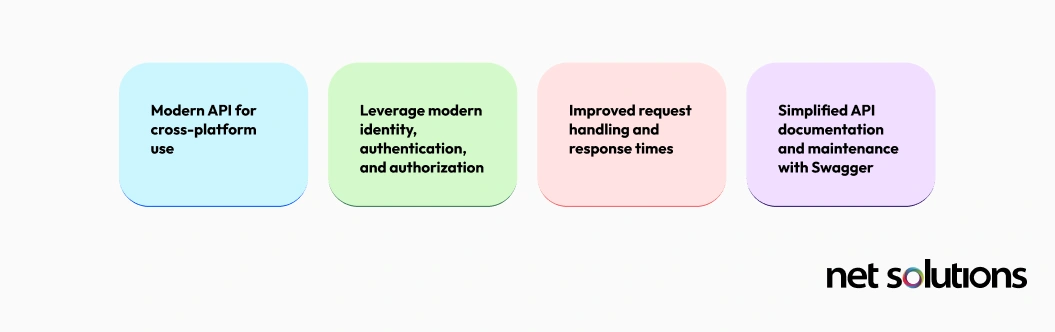
- Migrated from .NET Framework 4.6.1 to .NET 8
- Implemented RESTful API best practices
- Added API versioning and comprehensive documentation (Swagger/OpenAPI)
- Integrated modern authentication (OAuth 2.0, JWT)
Results
- 50% reduction in API response times
- 70% decrease in server resource utilization
- Enhanced security posture with modern authentication
- Improved developer experience with auto-generated API documentation
Modernizing Background Services
Enterprise applications commonly rely on background processing using the .NET Framework. Recently, we helped several clients transition their background processing to .NET 8.
Project A: Hangfire Migration
Challenge: Transition a complex scheduled job system from Windows-dependent to cross-platform.
Solution
- Migrated to .NET 8 with Hangfire
- Implemented distributed job processing
- Added comprehensive monitoring and alerting
Results
- Cross-platform deployment capability (Windows & Linux)
- Improved job reliability with automatic retries
- Real-time monitoring dashboard for the operations team
- 30% cost reduction through Linux deployment

Project B: Worker Services Implementation
Challenge: Replace legacy Windows Services with modern, cloud-native background processing.
Solution
- Implemented .NET Worker Services template
- Containerized with Docker for deployment flexibility
- Integrated with Azure Service Bus for message processing
Results
- Cloud-native architecture enables horizontal scaling
- Reduced maintenance overhead with containerization
- Improved observability with structured logging and metrics
- 25% performance improvement in processing throughput

WCF Service Transformation
Challenge: Migrate critical Windows Communication Foundation (WCF) services to enable cloud capabilities, modernize the development experience, and improve performance.
Solution
- Migrated from WCF to CoreWCF on .NET 8
- Maintained service contracts for backward compatibility
- Added modern observability (OpenTelemetry)
- Implemented containerization for flexible deployment
Results
- Cloud deployment capability (Azure, AWS)
- 40% performance improvement in service response times
- Maintained backward compatibility with existing clients
- Enhanced monitoring and troubleshooting capabilities

Optimized Linux Deployment
Challenge: Reduce infrastructure costs by shifting from an expensive Windows environment to Linux.
Solution
- Migrated application to .NET 8
- Replatformed to Linux (Ubuntu) servers
- Implemented containerization with Docker
- Deployed on a cost-effective infrastructure
Results
- 60% reduction in infrastructure costs
- Eliminated Windows Server licensing fees
- Improved scalability with container orchestration (Kubernetes)
- Better resource utilization on the Linux platform

Our Proven Modernization Process
A successful engagement starts with rigorous planning to ensure zero downtime and maximum ROI.
- Phase 1: Assessment & Audit: We perform a deep dive into your “Tech Equity,” identifying platform-specific code, security vulnerabilities (GDPR/HIPAA compliance), and third-party dependencies.
- Phase 2: AI-Assisted Implementation: Using our AI-enhanced pipeline, we build a clean new project structure rather than simply converting legacy files. This ensures your code meets modern LTS standards.
- Phase 3: Secure Deployment: We implement CI/CD pipelines with blue-green or canary deployment strategies to ensure business continuity.
Strategic Bridge: How We Help You Modernize
If your business is currently tethered to legacy .NET versions, our team can help you build a Modernization Roadmap that aligns with your growth goals.
Whether you need a “Strangler Fig” approach to gradually replace modules or a full-scale replatforming to Linux, we provide the architectural expertise and AI-driven speed to execute flawlessly.
Looking Ahead: Preparing for .NET 10
Modernization is not a destination; it is a continuous discipline. The enterprises that treat migration as a one-time project inevitably find themselves back in technical debt within a few years.
Microsoft ships a new .NET version every November. For enterprise planning, the key anchors are:
- .NET 8 (LTS): Current enterprise standard; supported through November 2026
- .NET 9 (STS): Early access to AI-native capabilities and performance gains
- .NET 10 (LTS): Released November 2025; the next long-term stability anchor
If you are mid-migration to .NET 8 today, that remains the right call. But your architectural decisions now should be made with .NET 10 in mind. The upgrade path between modern .NET versions is low-friction and often achievable in days , a stark contrast to migrating from the Framework.
What .NET 10 brings to the table:
- AI-native integration: Deeper Semantic Kernel and ML.NET support, eliminating manual orchestration plumbing for GenAI workloads.
- Performance gains: Continued JIT and memory improvements that reduce infrastructure costs without code changes.
- .NET Aspire at full maturity: Built-in service discovery, OpenTelemetry, and cloud-native orchestration as framework defaults, not bolt-ons.
- Full-stack Blazor: A more credible option for consolidating frontend and backend teams under a single .NET stack.
The most important implication is architectural: once you have crossed from .NET Framework to modern .NET, staying current is straightforward, provided the original migration was done right. Clean dependency injection, containerised deployments, and solid CI/CD pipelines during your .NET 8 migration will make .NET 10 adoption a non-event.
At Net Solutions, we design every engagement with this horizon in mind, and are open to running .NET 10 readiness assessments for forward-thinking clients.
Want to understand what .NET 10 means for your architecture? Get in touch for a forward-looking assessment of modernization.
Frequently Asked Questions
We reduce costs by utilizing AI tools to cut development time by 35% and by replatforming applications to Linux. This eliminates expensive Windows licensing and reduces cloud resource consumption by up to 60%.
Yes. We typically use the Strangler Fig Pattern to replace legacy components with modern .NET 8 services incrementally. This ensures your application remains functional for users throughout the entire process.
.NET 8 is a Long-Term Support (LTS) version, providing security and stability for at least three years. It is 24% faster than .NET 7 and is the first version truly optimized for native AI integration in the enterprise.
During our Assessment Phase, we identify all legacy NuGet packages. We either update them to .NET 8 compatible versions, find modern open-source alternatives, or develop custom wrappers to maintain critical business logic.